For many, Stardew Valley is a peaceful escape to pixelated pastoral bliss. The farmer wakes up, tends to parsnips, and maybe woos a certain purple-haired bachelorette. But after a few in-game years, even the most devoted virtual agrarian may think: "Wouldn't it be nice if my horse wore a top hat?" Or "What if I could automate my entire farm and spend all day fishing?" That's where modding comes in, and the good news is that the game's creator, ConcernedApe, is totally on board. In fact, he actively encourages players to tinker with the game. No bans, no anti-cheat paranoia—just pure, unadulterated customization.
So, how does one transform their humble farm into a modded marvel? The process begins with a tiny but mighty tool: SMAPI (Stardew Modding API). As of 2026, SMAPI remains the essential mod loader, updated regularly to keep pace with Stardew Valley's ever-evolving charm. This guide walks you through the installation on Windows—though Mac and Linux farmers can follow along with slight tweaks. Buckle up your overalls, it's time to dive in.
Why Mod? Because Vanilla is Just the Beginning
Think of vanilla Stardew Valley as a hearty bowl of parsnip soup. It's warm, comforting, and exactly what you need on a rainy day. But what if you want some animal crackers floating on top? Mods are those crackers—they add flavor, convenience, and the occasional talking tractor. Whether it's aesthetic texture packs that turn your chickens into tiny raptors, quality-of-life tweaks like seeing NPC locations on the map, or massive expansions like Stardew Valley Expanded, the modding community has cooked up thousands of creations. And the best part? You'll never get banned for using them. The developer has famously stated his support, so you can mod with confidence. No need to hide in the bushes when you log into Steam.
Now, the star of the show is SMAPI. Without it, mods are just lonely files sitting in a folder. SMAPI is the bridge that lets them talk to the game. Installing it isn't rocket science—it's more like planting a seed. Follow these steps, and you'll soon be harvesting a bumper crop of modifications.
Part A: Installing SMAPI – The Seed of Mayhem
Before you do anything, ensure you've launched unmodded Stardew Valley at least once. This lets the game set up its first-time configurations and ensures SMAPI can do its job without tripping over loose files. Think of it as tilling the soil.
Next, head over to SMAPI's official website—the only place you should ever download it. (Trust me, the internet is filled with weird third-party sites that might offer you a "super SMAPI" that also installs a crypto miner. Not today, Joja Corp.) Download the latest version. Don't worry if it's 2026 and the version number looks like a phone number; the process remains the same. You'll get a .zip file.
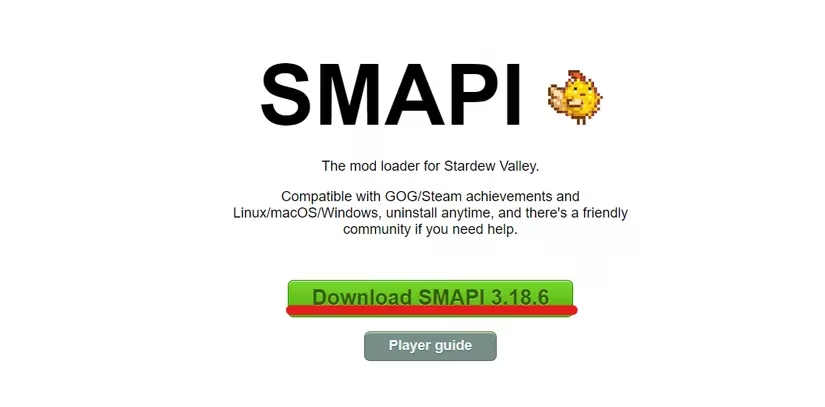
Extract that .zip anywhere convenient—your Downloads folder is perfectly acceptable. You're not building a spaceship; it's just a mod loader. Open the extracted folder and locate the install file that matches your operating system (Windows users look for "install on Windows.bat"). Double-click it, and a console window will pop up, displaying text that might look daunting but is actually friendlier than a junimo. Follow the on-screen prompts. It'll ask where your game is installed (usually it finds it automatically). Watch for the magical green text that signals success. And here's a pro-tip: don't close that window just yet! You'll need it for the next step, like a recipe that requires a bay leaf you then remove—except you don't remove this one.
Part B: Configuring Steam – Because Achievements Taste Like Stardrops
Listen, if you don't care about Steam overlays, playtime tracking, or those sweet, sweet achievement notifications, you can simply launch the game via the new "StardewModdingAPI.exe" file in your game folder. Bam, you're modded. Go forth and watch your tractor do the watering.
But most of us want to see the little pop-ups that say "Gofer" or catch a screenshot with F12. Who doesn't want to brag about their 200 hours of modded farming? To keep those Steam features alive, you need to tweak the launch options. Don't worry—this isn't coding; it's copy-pasting.
Remember that installer window you wisely kept open? Look for a line that says something like: "If you use Steam, set your launch options to enable achievements (see smapi.io/install):" Below it is a string of text that looks like a file path inside quotes, ending with %command%. That string is your unique launch option. Copy the entire thing, quotes and all. Seriously, don't leave out the quotation marks or the %command% part, or your farmer might end up in a void egg paradox.

Now open your Steam client. Find Stardew Valley in your library, right-click it, and select "Properties." A window appears with all sorts of tabs you can ignore. On the General tab, you'll see a box labeled "Launch Options."
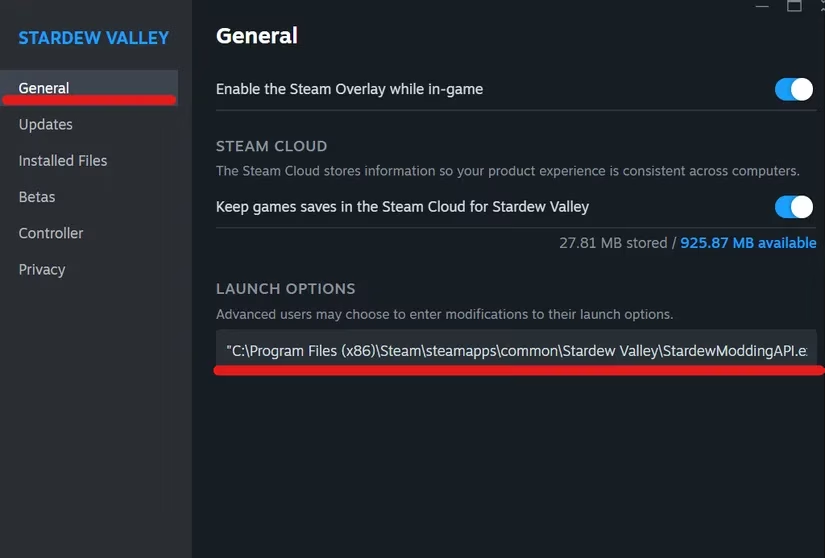
Click into that box, delete anything already there (or add to a blank field), and paste the entire string you copied. It should look something like: "C:\Program Files (x86)\Steam\steamapps\common\Stardew Valley\StardewModdingAPI.exe" %command%. The exact path will vary based on your system, so don't panic if it's not identical. The key ingredients are the quotes and the %command% at the end.
Close the properties window. From this moment onward, whenever you launch Stardew Valley through Steam, it will start SMAPI automatically. You'll see a console window pop up alongside the game—that's just SMAPI doing its thing, loading your mods. Minimize it, ignore it, or wave at it; it doesn't mind.
The Final Harvest
After finishing these steps, you're ready to explore the vast world of Stardew mods. Will you turn your cows into festive unicorns? Install a time-freezing mod so you can finally talk to everyone in one day? Or perhaps dive into the deep end with Stardew Valley Expanded, which adds new NPCs, areas, and enough content to make you forget what year it is (2026 in real life, still Year 1 in Pelican Town). The choice is yours, farmer.
Modding is the spice of life in this farming sim, and with SMAPI as your trusty hoe, you can cultivate an experience that's uniquely yours. So go ahead, break free from vanilla. Just remember to back up your save files occasionally—in case a mod decides your horse is now a flying goat. Happy farming, and may your crops never wither.
Leave a Comment